
MyStuff 2.0: The Ultimate 2026 Guide to McDonald’s Employee Portal, Schedules, Payslips & Work Tools
Introduction: What MyStuff 2.0 Actually Is and Why Employees Use It Daily
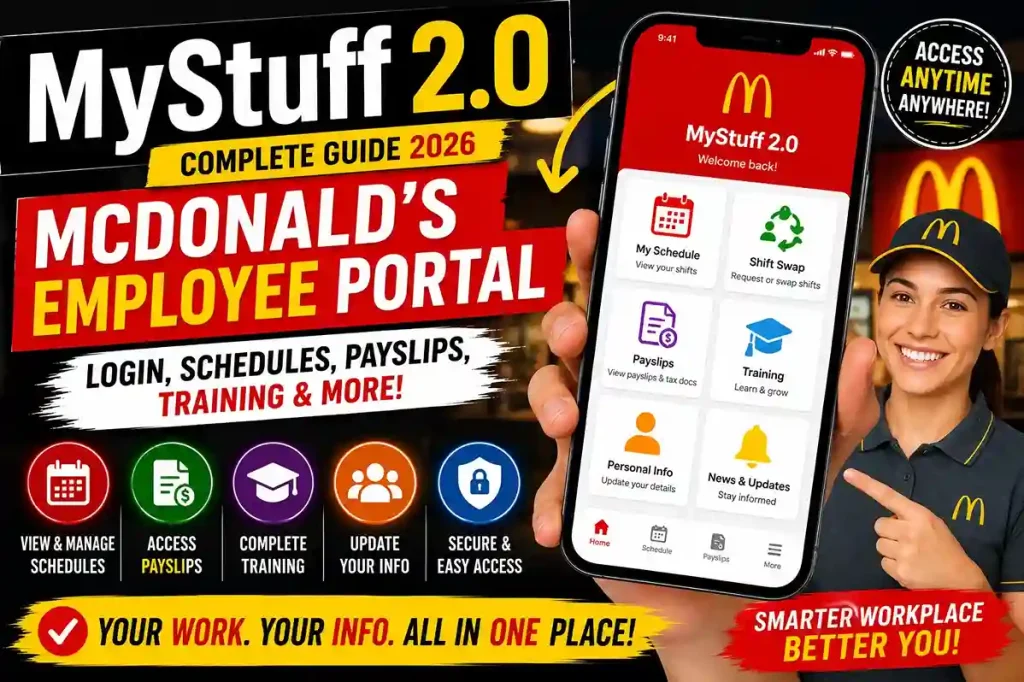
MyStuff 2.0 is a digital employee self-service platform primarily used by McDonald’s staff, especially in the United Kingdom, to manage work-related information through a single online portal. Instead of relying on paperwork, printed schedules, or constant manager communication for routine tasks, employees can access almost everything they need in one place.
The platform acts as a centralized digital workplace hub where employees can:
- Check schedules and rotas
- View payslips and payroll information
- Request or swap shifts
- Complete online training
- Access HR policies and company updates
- Track performance and learning progress
- Update personal information securely
Because MyStuff 2.0 is web-based and mobile-friendly, employees can access their accounts anytime using smartphones, tablets, or computers. This flexibility is one of the main reasons the system has become such an important part of modern workplace management at McDonald’s.
For many employees, especially crew members and shift managers, MyStuff 2.0 is not just another HR tool. It is part of everyday work life. From checking tomorrow’s shift to downloading payslips before payday, the platform helps staff stay organized while reducing unnecessary paperwork and manual processes.
This complete guide explains:
- What MyStuff 2.0 is
- How it evolved
- How employees use it daily
- Login and first-time setup steps
- Schedules, payroll, and training tools
- Security and privacy features
- Benefits for employees and managers
- Common issues and troubleshooting tips
If you want a clear and detailed understanding of MyStuff 2.0, this guide covers everything you need to know.
What Is MyStuff 2.0?
MyStuff 2.0 is an employee self-service portal designed mainly for McDonald’s employees in the UK. It allows staff to manage work-related tasks digitally without needing to contact HR or managers for routine requests.
The system provides employees with direct access to:
- Work schedules
- Shift management tools
- Payroll information
- Tax documents
- Training modules
- Company updates
- Employee benefits
- HR resources
The goal of the platform is simple:
make workplace management faster, easier, and more organized for both employees and management.
Instead of using multiple systems, MyStuff 2.0 combines everything into one digital workspace.
The Evolution of MyStuff 2.0
Before digital employee portals became common, McDonald’s staff relied heavily on:
- Printed schedules
- Manual payroll systems
- Paper HR forms
- In-person shift requests
These processes often caused:
- Delays
- Miscommunication
- Scheduling confusion
- Administrative workload
To modernize operations, the original MyStuff portal was introduced as a basic digital management tool.
Over time, workplace technology evolved and employee expectations changed. Staff increasingly wanted:
- Mobile access
- Real-time updates
- Faster communication
- Digital payroll tools
- Online learning systems
This led to the development of MyStuff 2.0.
The upgraded version introduced:
- Improved interface design
- Mobile compatibility
- Shift swap requests
- Online training modules
- Better payroll access
- Enhanced communication tools
- Performance tracking
- Secure authentication systems
Today, MyStuff 2.0 functions as a comprehensive workplace management platform rather than just a schedule viewer.
Why McDonald’s Employees Rely on MyStuff 2.0
For McDonald’s employees, MyStuff 2.0 simplifies many everyday tasks.
Instead of contacting managers repeatedly, staff can independently:
- View schedules
- Download payslips
- Track hours worked
- Complete required training
- Access company policies
This reduces administrative pressure while improving transparency.
Streamlining Daily Operations
The platform helps employees:
- Check upcoming shifts quickly
- Track schedule changes
- Request shift swaps
- Monitor attendance
- Access important work information
Managers also benefit because scheduling and communication become more organized digitally.
Easier Payroll Management
Employees can:
- View digital payslips
- Download payroll records
- Check deductions
- Review tax information
- Update bank details
This reduces confusion around payment issues and improves payroll transparency.
Better Training and Career Development
MyStuff 2.0 also acts as a learning platform.
Employees can:
- Complete training modules
- Track certifications
- Review progress
- Set development goals
- Access onboarding tools
This supports long-term career growth within the company.
Centralized Communication
The portal allows McDonald’s to share:
- Company news
- Policy updates
- Workplace announcements
- HR information
in one organized location.
This helps teams stay informed consistently.
Who Can Use MyStuff 2.0?
The platform is mainly designed for:
- Crew members
- Shift managers
- Restaurant managers
- Office staff
- Part-time employees
- New hires
- Some franchise workers
In certain cases, former employees may retain temporary access to retrieve documents before account closure.
How to Access MyStuff 2.0
Accessing the platform is straightforward.
Step 1: Visit the Portal
Employees can:
- Open the official web portal
- Use the mobile-compatible version
- Download supported apps if available
Step 2: Enter Login Credentials
Users typically log in using:
- McDonald’s email
- Assigned username
- Password
Step 3: Complete Verification
The system may require:
- Two-factor authentication
- Verification codes
- Device confirmation
for additional security.
Step 4: Access Dashboard
After login, employees can view:
- Schedules
- Payroll
- Training
- Messages
- Documents
- HR resources
from the main dashboard.
First-Time Setup for New Employees
New employees usually complete setup shortly after joining.
Check Welcome Email
Most new hires receive:
- Registration links
- Login instructions
- Temporary access credentials
through onboarding emails.
Create Account Credentials
Employees must:
- Confirm identity
- Create secure passwords
- Register account information
Add Personal Information
Users may need to provide:
- Phone numbers
- Bank details
- Emergency contacts
for payroll and communication purposes.
Verify Devices
Verification codes may be sent to:
- Mobile phone
to confirm secure access.
Explore Onboarding Resources
Many onboarding tools connect directly with MyStuff 2.0, including:
- Orientation tasks
- Training modules
- Uniform information
- Workplace policies
Key Features of MyStuff 2.0
Schedules and Rotas
Employees can:
- View weekly schedules
- Check shift details
- Request open shifts
- Submit swap requests
- Track approvals
This significantly reduces scheduling confusion.
Payroll and Payslips
The payroll section allows employees to:
- Access digital payslips
- Download PDFs
- Review payment details
- Track deductions
- Update banking information
Everything is centralized digitally.
Training Modules
Learning tools help employees:
- Complete required certifications
- Improve customer service skills
- Review workplace procedures
- Track progress
Many modules include:
- Videos
- Quizzes
- Completion badges
HR Resources
Employees can access:
- Company policies
- Benefits information
- Workplace guidelines
- Leave request tools
- Performance resources
Company Documents and Updates
The platform stores:
- News updates
- Workplace announcements
- Personal files
- Policy documents
in searchable categories.
How Schedules and Rotas Work in MyStuff 2.0
Schedules are one of the most frequently used features.
Employees can:
- Log in anytime
- View upcoming shifts
- Monitor changes
- Request available shifts
- Swap schedules with coworkers
Managers can approve or decline requests digitally.
This reduces manual scheduling problems significantly.
Payroll, Payslips and Employee Benefits
The payroll section helps employees:
- Review total hours worked
- Check holiday balances
- Monitor deductions
- Submit payroll concerns
Digital access makes payroll management faster and more transparent.
Training and Career Development Tools
Training tools support:
- New employee onboarding
- Skill development
- Safety certifications
- Customer service improvement
- Career progression
Employees can monitor:
- Completed courses
- Pending training
- Upcoming refreshers
directly inside the portal.
Accessing Documents and Company Files
MyStuff 2.0 acts as a document management system.
Employees can:
- Search policies
- Download forms
- Read announcements
- Save important records
This reduces dependency on paper documents.
Security and Data Protection
Security is a major focus of MyStuff 2.0.
The platform uses:
- Encrypted logins
- Two-factor authentication
- Secure verification systems
- Protected payroll storage
to help safeguard employee data.
Security Best Practices for Employees
Employees should:
- Avoid public Wi-Fi
- Use strong passwords
- Enable verification steps
- Log out on shared devices
- Update passwords regularly
These habits improve account protection significantly.
Benefits of MyStuff 2.0 for Employees
Saves Time
Employees can quickly access:
- Schedules
- Payslips
- Training
- Requests
without waiting for managers.
Reduces Workplace Stress
Having everything organized digitally helps reduce confusion and improves workflow.
Supports Career Growth
Training tools encourage:
- Skill development
- Internal promotions
- Professional growth
within the company.
Improves Communication
Employees and management can stay updated through centralized announcements and scheduling tools.
Helps Restaurants Operate More Efficiently
Managers benefit from:
- Better scheduling
- Organized communication
- Faster administrative handling
which improves overall restaurant operations.
Common MyStuff 2.0 Issues and Troubleshooting Tips
Forgotten Passwords
Most login issues can be solved using:
- Password reset links
- Verification codes
- Identity confirmation
Schedule Not Updating
Sometimes refreshing the portal or logging out and back in resolves synchronization issues.
Payroll Concerns
Employees should:
- Compare hours worked with payslip records
- Use reporting tools for discrepancies
Training Modules Not Loading
Common fixes include:
- Updating browsers
- Clearing cache
- Trying another device
Why Digital Employee Portals Like MyStuff 2.0 Matter
Modern workplaces increasingly depend on digital systems because they:
- Reduce paperwork
- Improve efficiency
- Enhance transparency
- Save time
- Simplify communication
MyStuff 2.0 reflects this broader shift toward digital workplace management.
Final Thoughts on MyStuff 2.0
MyStuff 2.0 has become an essential digital workplace tool for McDonald’s employees, especially in the UK. By combining schedules, payroll, training, communication, and HR resources into one secure platform, it simplifies everyday work management while improving organization and efficiency.
The platform helps employees:
- Stay informed
- Manage shifts
- Access payroll information
- Develop new skills
- Communicate more effectively
At the same time, strong security systems help protect sensitive employee data and ensure safe account access.
As workplace technology continues evolving, platforms like MyStuff 2.0 will likely become even more important in supporting flexible, connected, and efficient employee experiences across modern organizations.